Kpay offers the best technology by best
meeting the needs of the Senegalese.

Client
Paynet Systems
Tools
Figma, Miro, Notion, Slack
Services
UX Design & Research, Mobile Application Design, Prototyping, Branding
Project Overview
KPay is a 100% Senegalese mobile money transfer service that offers users a seamless and secure platform for managing their financial transactions. The service encompasses a range of functionalities including deposits, transfers, withdrawals, bill payments, credit purchases, merchant payments, and both domestic and international transfers. Designed with user convenience in mind, KPay aims to simplify daily financial operations for Senegalese users.
Goal
The primary objective was to design a mobile application that is intuitive, secure, and accessible, enabling users to perform a variety of financial transactions effortlessly. The app seeks to promote financial inclusion by offering affordable services with competitive fees, such as zero-cost deposits and withdrawals, and a minimal transfer fee of 0.7%.
Process
To meet the evolving digital needs of NMB Bank’s customers, we designed a fully responsive and user-friendly mobile banking application that merges security, functionality, and ease of use. Our solution focused on:
User Research
Conducted surveys and interviews with potential users to understand their financial habits, needs, and pain points with existing mobile money services.
Competitive Analysis
Analyzed other mobile money applications in the Senegalese market to identify best practices and areas for differentiation.
Information Architecture
Structured the app’s content to ensure logical flow and easy navigation, prioritizing the most frequently used features.
Usability Testing
Conducted testing sessions to identify usability issues and refine the design based on user feedback.
Multi-Language Support (Planned)
Proposed a future-proof foundation for introducing local language support to improve accessibility and user comfort.
Typical User Journey
Registration and Authentication
Users sign up using their phone number and set up a secure PIN or use biometric authentication for future logins.
Dashboard Overview
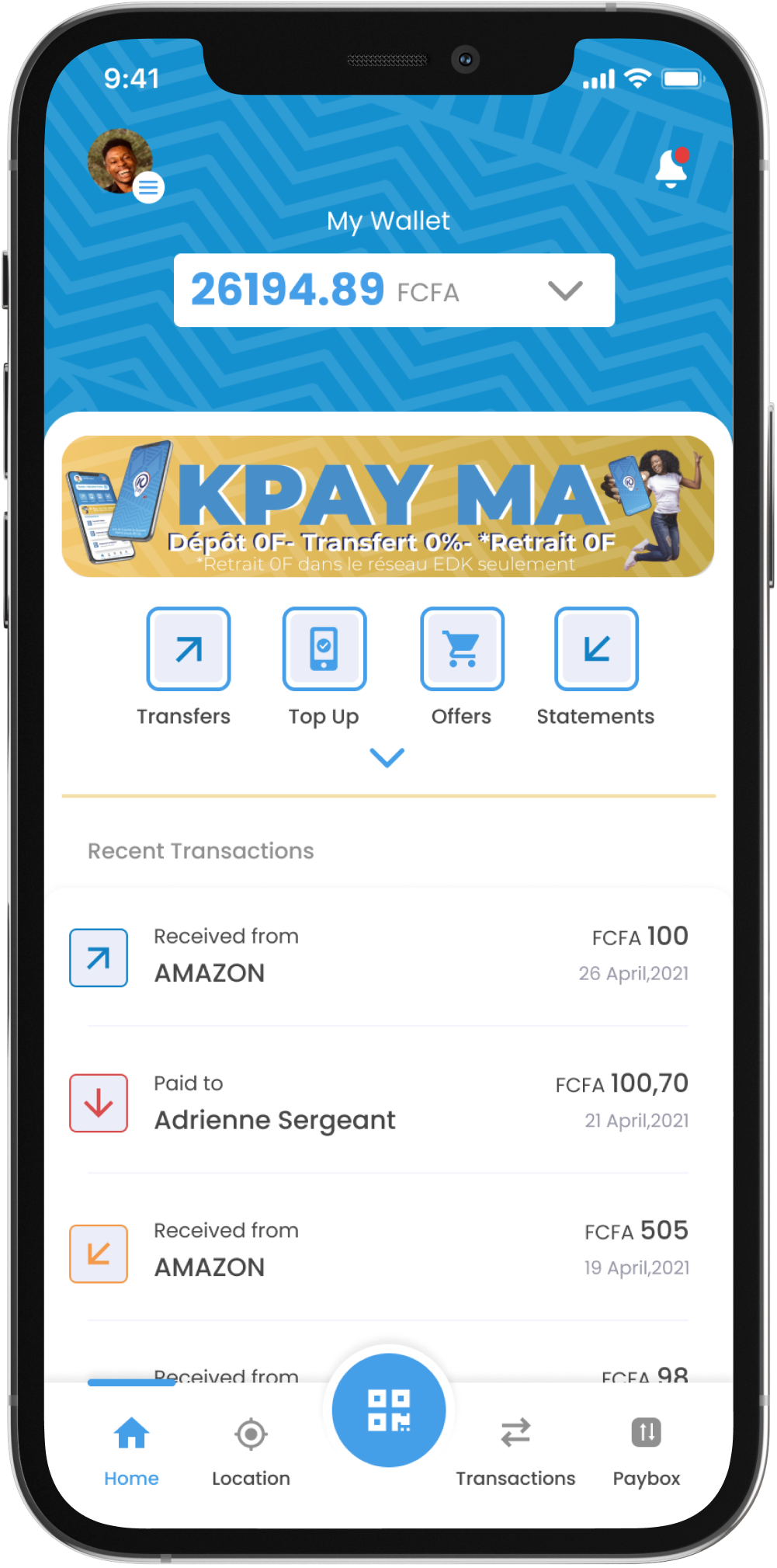
Upon logging in, users are presented with an overview of their account balance and recent transactions.
Performing Transactions
Information Architecture
Structured the app’s content to ensure logical flow and easy navigation, prioritizing the most frequently used features.
Usability Testing
Conducted testing sessions to identify usability issues and refine the design based on user feedback.
Multi-Language Support (Planned)
Proposed a future-proof foundation for introducing local language support to improve accessibility and user comfort.
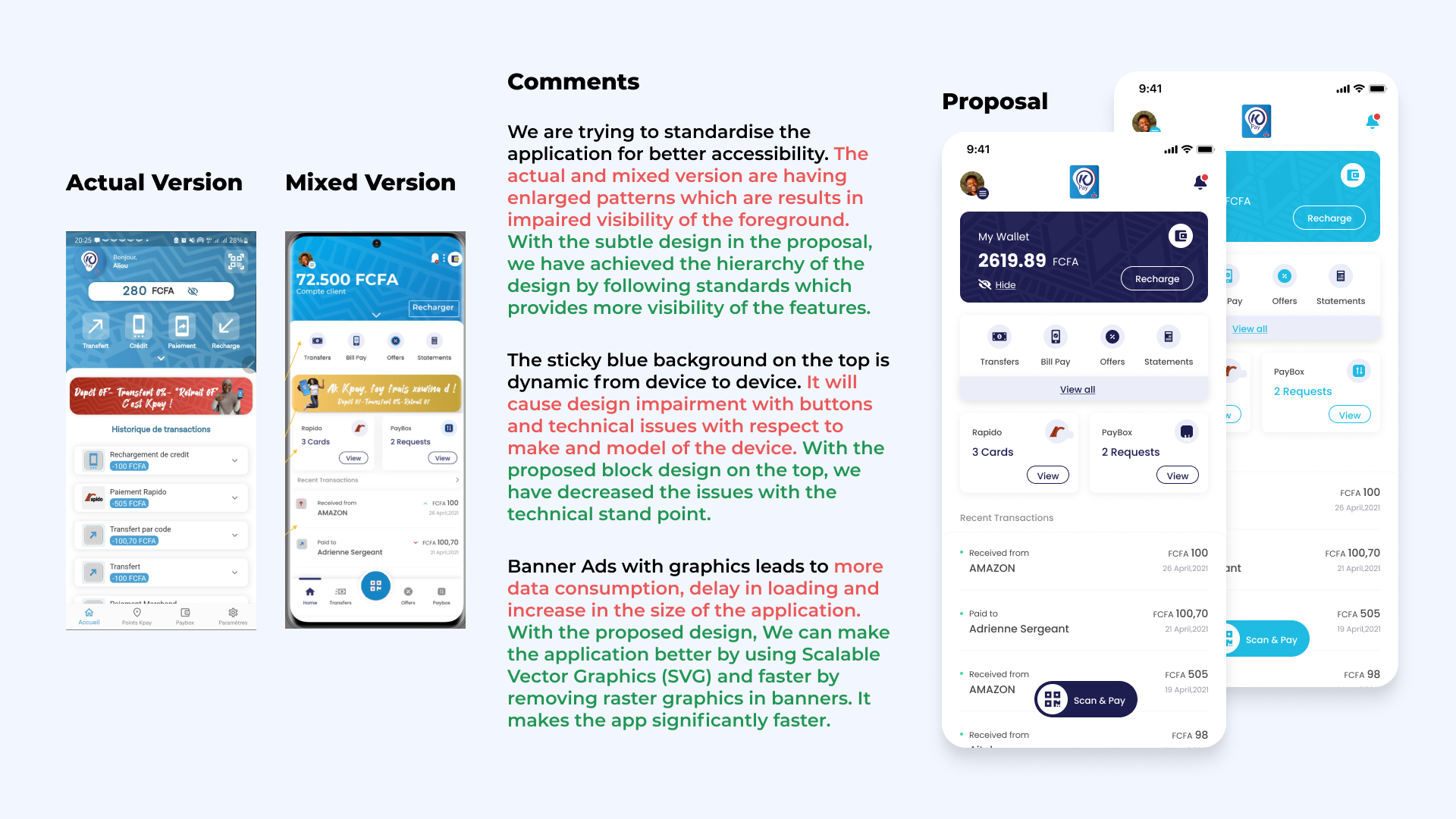
💡 Proposed Solution
To meet the evolving digital needs of NMB Bank’s customers, we designed a fully responsive and user-friendly mobile banking application that merges security, functionality, and ease of use. Our solution focused on:
Human-Centered Design: Prioritized simplicity, accessibility, and clarity across all screens. Employed familiar design patterns for key tasks such as fund transfers, bill payments, and account summaries.
Modular Architecture: Created scalable UI components that adapt to new banking features, ensuring long-term maintainability and easier updates.
Self-Service Functionality: Designed intuitive flows for account activation, password reset, and biometric login to reduce dependency on branch visits or call support.
Secure Interaction Design: Incorporated layered authentication, masked sensitive data, and contextual feedback to build user trust without overwhelming users.
Multi-Language Support (Planned): Proposed a future-proof foundation for introducing local language support to improve accessibility and user comfort.
⌛️ Problem Solved
Legacy banking systems often lack digital agility and present fragmented user experiences. Financial institutions face challenges like:
Fragmented User Experience: The existing digital offerings lacked consistency and had outdated UI flows. Our redesign offered a unified, cohesive app experience aligned with NMB Bank’s brand identity.
Complex Banking Processes: Users found it difficult to complete basic banking tasks. We simplified user journeys, reduced steps for core actions, and improved visibility of key tasks like transfers, payments, and balance checks.
Low Adoption by Non-Tech-Savvy Users: Through guided interactions, tooltips, and visual cues, we designed an experience that supported users across varying levels of digital literacy.
Security vs Usability Conflict: We ensured banking-grade security features such as 2FA and biometric login were integrated without creating cognitive friction, making security feel seamless.
High Support Load: By enabling more self-service features within the app (like account recovery and request management), we reduced the need for physical or customer care intervention.
💡 Key Features
Self-Service Options
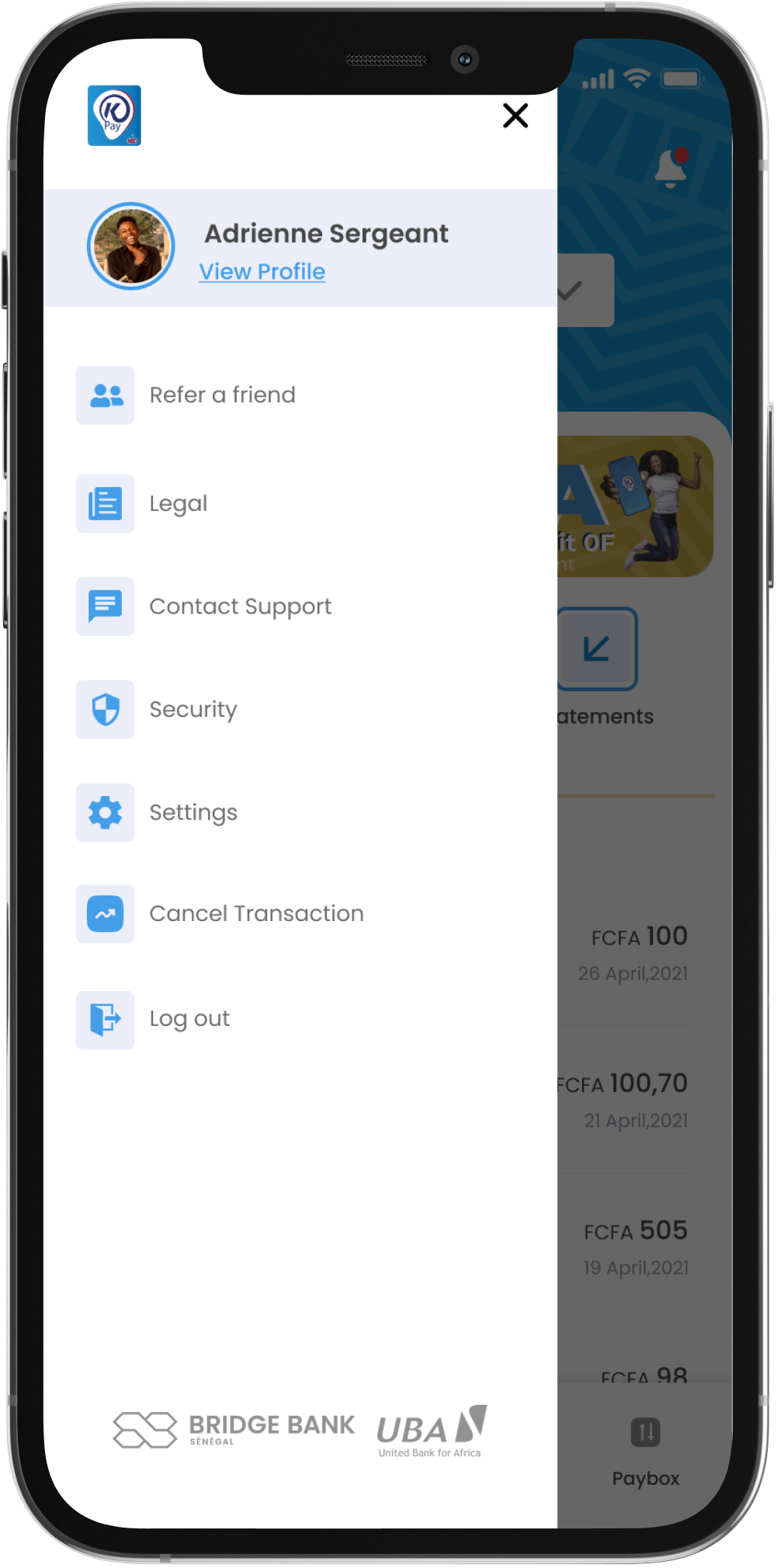
Users can activate the application, reset PINs, and manage their profiles without visiting a branch.
Comprehensive Account Management
View account balances, transaction histories, fixed deposits, and loan details.
Enhanced Security
Utilizes Extended Two-Factor Authentication (ETFA) and biometric authentication to ensure secure transactions.
QR Code Payments
Facilitates contactless payments by scanning QR codes at merchant locations.
Fund Transfers
Supports intra-bank and inter-bank transfers, including scheduling recurring transfers.
Bill Payments and Mobile Top-Up
Enables users to pay utility bills and recharge mobile phones conveniently.
In-App Notifications and Alerts
Real-time updates on transaction status, offers, or suspicious activity. Designed with a clear hierarchy and iconography to draw attention without being intrusive.
One-Tap Quick Access
Users can pin frequently used services (e.g., top-up, bill pay, mini statement) to the home screen for instant access — reducing navigation time and improving task efficiency.
Transaction Scheduling
Users can schedule recurring transfers or bill payments with visual calendar integration and reminders, promoting financial planning and reducing missed payments.
Challenge
- Simplifying Complex Onboarding Flows
- Ensuring Secure Document Verification
- Balancing Personalization with Scalability with minimalism
- Enhancing Accessibility for All Users
- Optimizing for Mobile and Desktop
Outcome
The KPay mobile application has been well-received in the Senegalese market, with users appreciating its affordability, ease of use, and comprehensive feature set. The app has seen a steady increase in user adoption, contributing to greater financial inclusion in the region.
Takeaways
-
Affordability Drives Adoption:
Offering low-cost services is a significant factor in attracting users in emerging markets. -
User-Centric Design is Essential:
An intuitive and easy-to-navigate interface enhances user satisfaction and retention. -
Security Builds Trust:
Implementing robust security measures is vital in gaining and maintaining user trust in financial applications. -
Continuous User Education:
Providing ongoing education and support helps users fully utilize the app’s features and promotes loyalty.